Search in Repertories
OpenRep SYNOPSIS offers the superior search capability that allows searching in one or multiple repertories at the same time.

To search for a single or multiple words, enter the words into the search edit. If searching for multiple words, every word has to be delimited by a space.
Search results will contain all symptoms with all the words entered into the search edit. By using the dots ".", it is possible to specify the words closer.
When entering the word "ear", OpenRep will return all the symptoms containing any word like "rear", "ear" or "ears".
The search word ".ear" will only return the symptoms with words starting with the characters "ear", therefore "ears" or even "earrings".
The search word "ear." will return symptoms with words starting with the characters "ear", for example "rear" or "pear".
The search word ".ear." will only return the symptoms containing the words "ear".
Additional functions
After clicking the Search and display the results in a separate window, the search will be displayed in a newly opened window. There is no limit to how many windows can be opened at the same time, which makes it perfect to compare different search results.
The sel button performs the search in the currently selected repertory only. The all button allows to search in all the selected repertories at the same time.
The Select the repertories to search in allows to select which repertories the search should be performed. After selecting the repertories, it is necessary to select the Search in SELECTED repertories.

The search history icons allows to display the previous or next search results or reset the search results.
Synonyms
OpenRep SYNOPSIS features the synonym support that always performs apart the search in the specified words also in all the similar words (synonyms).
Dictionary

After clicking the Dictionary button, the dictionary dialog will appear. When the dialog is visible, after clicking on any symptom in the repertory, the contents of the symptoms will be copied into the Dictionary dialog. After clicking on any word copied into the Dialog, the definition of the word as well as the list of similar words will appear. In order to perform the search in the dictionary, simply put the word into the search bar and press the ENTER key.
Reversed Materia Medica
OpenRep SYNOPSIS features a powerful tool to study remedies and analyze the case - the reversed materia medica. The reversed materia medica is a materia medica composed from the currently selected repertory.
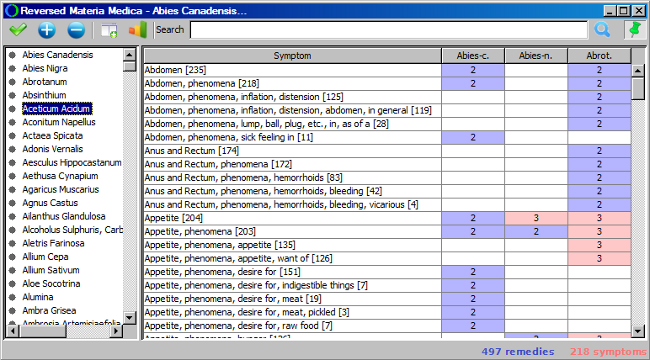
To view the contents of the remedy, select the remedy from the list of remedies and click the Display symptoms for the selected remedy button.
However, the main feature is to compare the remedies, when it is difficult to decide which remedy to prescribe. This can be done by clicking the remedy name of another remedy and clicking the Add remedy to reversed materia medica. This will display remedies side by side. To remove the remedy from the comparison, click on the remedy shortcut in the comparison table and click the Remove remedy from reversed Materia Medica.
Reversed materia medica features also a set of powerful filters, that allow to highlight only specific symptom in the compared remedies. First is the search facility, that allows displaying only the symptoms containing certain words. This can be done by entering the words into the search edit and pressing the ENTER key. Another filter allows to view only the symptoms in which all the selected remedies have achieved only a certain grade. By clicking the Select remedy grade button it is possible to activate and also deactivate this filter. If we are however interested only in the small symptoms, we can filter them by clicking the Select symptom size button.